Creatorium review
Summary
Creatorium packs 36 browser apps for puzzle books, planners, coloring pages, carousels and short videos into one studio. The $17 Core front end includes 15 apps, with no monthly fees and a vendor-promised 30-day guarantee. Research-based review — we have not bought it.
- Pricing model: One-time payment
- Price: $17.00 (USD, checked 23 Nov 2026; may have changed)
Overview
The quick answer
Creatorium is a browser-based creator studio from Rayane Assif (Agencoz) that packs 36 small apps into one product: puzzle-book makers, planner and journal builders, coloring-page generators, carousel and quote-post designers, short-video tools, hook and caption writers, listing builders and a content calendar. The $17 front end, Creatorium Core, includes 15 of those apps. The other 21 sit behind six upgrades, a $197 Platinum tier and a $297 Bundle that includes everything.
There is no AI inside it and no API key to buy. The apps generate puzzles, pages, posts and videos with built-in templates and rules, in your browser. That is both the point and the limit: everything works offline from subscriptions, but nothing here writes like ChatGPT or designs like a human — the Script Writer hands you a prompt to use with an AI assistant of your own if you want AI-written scripts.
If you make low-content books for Amazon KDP, sell printables on Etsy, or post daily on Instagram, TikTok and LinkedIn, this is one of the better-value launch offers of the month. If you only need one of those jobs done, a dedicated tool will do that one job better. And if you are buying it to "make money online", read the vendor's own FAQ first: "That depends on you. Creatorium gives you the tools to make products and content. Results depend on your effort, your niche and your market, and we make no promise of sales or earnings." That honesty is rare on a launch page, and it is the main reason this review is positive.
What is Creatorium?
Creatorium is a set of browser apps for people who create things to sell or post: puzzle books and journals for Amazon KDP, printables for Etsy, and carousels, quote posts, reels and thumbnails for social media. You open an app from the members area, type your theme or words, choose options, and download a print-ready PDF, a PNG post or an MP4 video. Your work saves in your browser as you go, so you can close the tab and pick up later.
The pitch is consolidation. The sales page puts it bluntly: without it you need a puzzle maker, a planner template, a design app, a video editor and a caption tool — five logins, five bills, and nothing talks to anything. Creatorium replaces that stack with one $17 payment and no monthly fees. The trade-off is depth: each app does one job in a straightforward way, and the fancier capabilities (unlimited use, done-for-you packs, full-wrap covers, client workspaces, reselling) are sold as upgrades.
It launched on 18 November 2026 on WarriorPlus and JVZoo, and the launch offer closes on Wednesday 25 November at 11:59 pm ET. The front-end price opened at $17 and rises to $27 during launch week; the sales page still showed $17 when we read it on 20 November.
Key features (Creatorium Core — 15 apps)
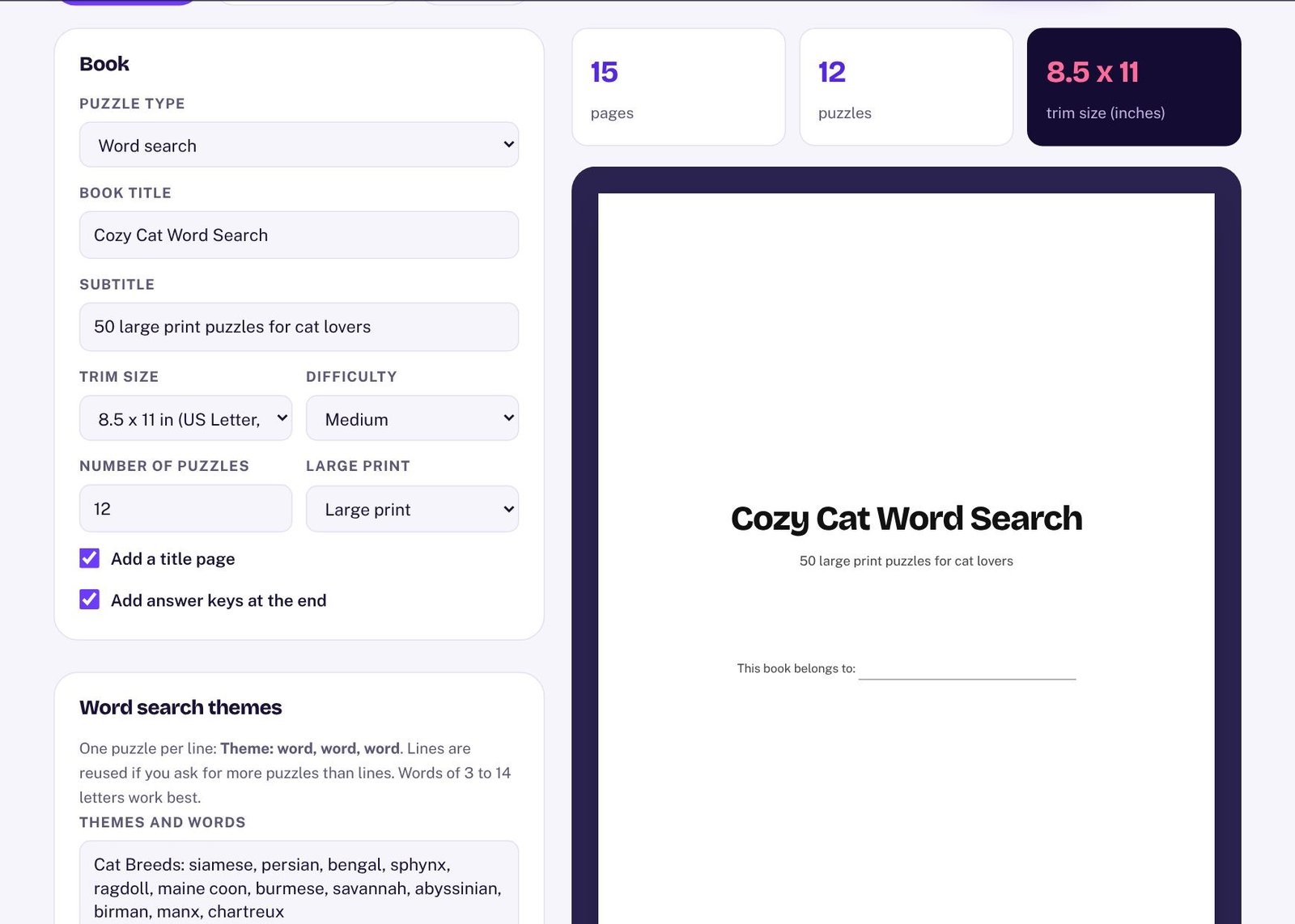
Puzzle Book Studio. Word search, sudoku and maze pages, print-ready in seconds. Sudoku puzzles are unique with one solution each, there is a large-print option, and every book gets a title page and answer keys. Exports as PDF at five real trim sizes: 8.5 x 11, 8 x 10, 7 x 10, 6 x 9 and A4.
Planner and Journal Studio. Monthly calendars, weekly spreads, daily pages, habit trackers, gratitude and reading journals, budget sheets, to-do lists and notes pages — 10 page types, dated from any month or undated, in your accent colour and style, exported as a print-ready PDF interior.
Coloring Page Studio. Mandalas, geometric patterns, floral gardens and kaleidoscopes as crisp vector line art — 4 styles, 3 detail levels, bold or fine lines, with blank backs to stop bleed-through. Every page is generated new.
Carousel Studio. Write one idea per line and get a cover, content slides and a call-to-action slide at 1080 x 1350 or 1080 x 1080. Eight palettes, four font styles, three layouts; download PNGs, or a PDF for LinkedIn.
Quote and Post Studio. Turn a quote, tip or number into a polished post in six layouts and four sizes, including Pinterest and Stories. Batch mode builds a whole set from a list in one click, with photo backgrounds.
Reel and Short Maker. Type your hook and lines, pick an animation and colours, add your own image or music, and it renders a 1080 x 1920 video in your browser for Reels, Shorts and TikTok — four text animations, a progress bar and a highlight box.
Hook Vault. 120 opening lines, filled in with your topic.
Caption and Hashtag Builder. Captions for every goal, with hashtag sets for 60 niches.
Short Video Script Writer. Timed scripts for short videos in six formats. It gives you a prompt you can use with any AI assistant — the app itself does not write with AI.
Video Cover Studio. Covers for Reels, Shorts and TikTok with safe zones marked.
Thumbnail Studio. YouTube thumbnails in six proven layouts at 1280 x 720.
Book and Product Listing Builder. Titles, descriptions and keywords for KDP and Etsy listings.
Puzzle Book Listing Builder. KDP, Etsy and Teachers Pay Teachers listings specifically for puzzle books.
Starter Niche Packs (bonus). Three ready niche packs: cats, Christmas and teachers.
30-Day Content Calendar. A month of posts, tracked from idea to posted.
How it works
The workflow is the same across the apps, and the sales page lays it out in four steps:
- Choose. Pick what to make: a puzzle book, a planner, coloring pages, a carousel, a quote post or a short video.
- Create. Type your theme or text. Creatorium lays out every page and slide, with answer keys, captions and covers.
- Publish. Save print-ready PDFs at real trim sizes, PNG posts and MP4 videos, plus titles, descriptions and keywords for your listings.
- Grow. Plan a month of content with the calendar, use the proven hooks and captions, and keep a steady weekly routine.
There is nothing to install and no account juggling: every app opens from the members area, and your access link arrives right after payment on the delivery page and in your receipt. One practical note from the FAQ: the printable studios use real inch sizes with no browser margins, so "Save as PDF" gives pages at the exact trim size you chose — but the vendor still tells you to check your proof before publishing, because every marketplace runs its own review.
Pricing — the full funnel
All prices below are from the official JV page and sales page, read 20 November 2026. The vendor promises the same 30-day money-back guarantee on every level, and affiliates earn 50% on every level. One caution from our checkout check on 23 November 2026: the WarriorPlus checkout page itself does not state a guarantee period — the 30-day promise appears on the sales and JV pages, so keep your receipt and those terms.
| Level | What you get | Price | Downsell |
|---|---|---|---|
| Front end — Creatorium Core | 15 apps listed above | $17, rising to $27 | — |
| Upgrade 1 — Unlimited | 12 more apps, no limits | $47 | $37 |
| Upgrade 2 — Done-For-You | 41 ready niche packs and puzzle book plans | $67 | $47 |
| Upgrade 3 — Studio Pro | Full-wrap covers, brand kit, pro reel templates | $47 | $37 |
| Upgrade 4 — Agency | Client workspaces and a commercial licence | $97 | $67 |
| Upgrade 5 — Reseller | Sell Creatorium Core and keep 100% | $127 | $97 |
| Upgrade 6 — Platinum | 12 monthly template drops, the Creator Business course, priority support (also sold on the front-end page) | $197 | $147 with PLATINUMVIP |
| Bundle | All 36 apps in one checkout | $297 | $247 with CREATORVIP |
A buyer who takes the Bundle pays $297 ($247 with the launch coupon). A buyer who takes every upgrade separately pays $599 in total. The vendor states a total value of $1,805 if the apps were bought one by one — that is the vendor's own valuation, not something we verified. There are no monthly fees at any level, and no API key or AI subscription to pay for.
The launch closes on Wednesday 25 November 2026 at 11:59 pm ET, and the front-end price rises from $17 to $27 during the week — so the cheapest entry is early in the launch, not at the end.
Who should use it
- KDP low-content publishers who make puzzle books, journals and planners and want answer keys and real trim sizes without paying a monthly subscription.
- Etsy printable sellers who need planners, trackers, coloring pages and journals in one place.
- Content creators and social media managers who post carousels, quote cards, hooks, captions and short videos every week and want a fast batch workflow.
- Teachers and parents who need word searches, mazes, sudoku and planners for class or home, printed in minutes.
- Small business owners who need posts and reels without hiring a designer or paying for a design subscription.
- Side-income seekers who already sell on KDP or Etsy and want one cheap tool that covers several product types.
Who should skip it
- Anyone buying it to "make money online". The vendor says it plainly and so do we: this is a set of tools, not an income system. It does not promise sales, views or followers, and neither do we.
- Buyers who need only one app. If you only ever make sudoku books, or only ever make Instagram carousels, a dedicated tool for that one job will serve you better than 15 apps you will not open.
- People who want AI writing or AI design. There is no AI in Creatorium. If you want AI-generated content, look at the AI tools on this site instead.
- Anyone who needs cloud sync across devices. Work saves in the browser you used. If you switch between a laptop, a tablet and a phone, that will frustrate you.
- Professional designers and video editors. The templates and layouts are practical, not premium. If your clients expect bespoke design, this is not your tool.
How we tested this
This review is research-based, not hands-on. We have not bought or used Creatorium. Every price, feature, upgrade, coupon, guarantee and limitation in this review comes from the product's official sales page (creatorium.agencoz.com) and its official JV/affiliate page (creatorium.agencoz.com/jv), both read in full on 20 November 2026, and cross-checked against the MunchEye launch listing. Where the vendor makes a claim we could not verify — such as the $1,805 total value — we say so. We do not report hands-on results, and we do not repeat earnings claims, because the vendor makes none. If we buy and use Creatorium later, this review will be updated and the date of the update noted here.
Final verdict
Creatorium is a fair deal at $17 and an honest one. Fifteen browser apps that make puzzle books, planners, coloring pages, carousels, quote posts and short videos — with no monthly fees, no API keys and a vendor-promised 30-day guarantee — is good value for anyone who will use more than one of them. The vendor's refusal to promise income, and the FAQ's straight answers about AI, refunds and what the front end actually includes, make this one of the more trustworthy launch offers we have reviewed.
Go in with your eyes open: only 15 of the 36 apps are in the front end, the sales page's checkout wording is muddled (it names JVZoo, but the purchase actually runs through WarriorPlus), and your work saves in your browser. If those three things are acceptable, and you make books, printables or social content more than once a month, Creatorium is worth the $17 before the launch closes on 25 November.
Our take: Buy Core for $17 if you will use at least two of the app groups. Skip the upgrades on day one — try Core first, and only add Unlimited or Done-For-You once you know which apps you actually open every week.
Related reviews: LabelForge review (printables and labels), Detective Casebook Studio review (puzzle case books), StoryDeck review (content creation).
Pros
- Real value at the front end. Fifteen working apps for $17, with no monthly fee, is genuinely cheap for what it does — even two or three of these apps would cost more as separate tools.
- No subscriptions, no API keys, no AI bill. Everything runs in the browser. There is nothing else to pay for after the purchase, which is rare for a creator tool in 2026.
- Print-ready means print-ready. Real trim sizes (8.5 x 11, 8 x 10, 7 x 10, 6 x 9, A4), answer keys included, large-print option, blank backs on coloring pages — the details that get a KDP file rejected are handled.
- Three markets in one purchase. Puzzle books and planners for KDP, printables for Etsy, and carousels, quote posts and short videos for social media. If you work in more than one of those, the value multiplies.
- Unusually honest vendor. No income claims anywhere; the JV rules ban affiliates from making them; the sales page says plainly "we make no promise of sales or earnings"; and the earnings disclaimer is on both the sales page and the JV page. The FAQ also tells you the real catches instead of hiding them.
- 30-day guarantee promised on every level. The sales and JV pages promise the same 30-day money-back guarantee on every product in the funnel — though the WarriorPlus checkout page does not restate the period (checked 23 November 2026), so keep your receipt.
- You own what you make. The puzzle books, planners, coloring pages, posts and videos are yours to publish and sell under your own name on Amazon KDP, Etsy or your own store.
Cons
- Only 15 of the 36 apps are in the front end. The headline number is 36, but Core is 15. The other 21 — including unlimited use, the done-for-you packs, full-wrap covers and client workspaces — sit behind upgrades that cost $47 to $197 each. Budget for that before you buy.
- Checkout wording is confusing. The main sales page says orders are processed by JVZoo, but following the buy button actually takes you to a WarriorPlus checkout — we verified the front end there at $17.00 on 23 November 2026. Worth knowing, not a deal-breaker.
- Breadth over depth. No single app here is as deep as a dedicated tool. Puzzle Book Studio covers word search, sudoku and mazes — no crosswords in Core — and the video tools make animated text videos, not edited footage. If you need one job done brilliantly, a specialist tool wins.
- No AI inside. If you expected an AI writer or designer, this is not it. The Script Writer hands you a prompt to use with an AI assistant of your own. For some buyers that is a plus (no API bill); for others it is a missing feature.
- Work saves in your browser. Your projects live in browser storage, not in a cloud account — switch devices or clear the browser and your in-progress work may not follow you. The sales page says a computer is recommended for printing and video.
- The $1,805 "total value" is the vendor's own number. It is a marketing valuation of the apps bought one by one, not a price anyone has paid. Judge the deal on the $17, not on the $1,805.
FAQ
Is Creatorium really $17 one time?
Yes — during launch week. The front end opened at $17 on 18 November 2026 and the price rises to $27 during the week, before the launch closes on 25 November at 11:59 pm ET. There are no monthly fees at any level.
Does Creatorium use AI? Do I need an API key?
No. The sales-page FAQ answers this directly: "No API key and no AI subscription. The puzzle, planner, coloring, design and video apps run on their own in your browser." The Short Video Script Writer gives you a prompt you can use with any AI assistant if you want to.
What exactly do I get for $17?
The 15 Core apps: Puzzle Book Studio, Planner and Journal Studio, Coloring Page Studio, Carousel Studio, Quote and Post Studio, Reel and Short Maker, Hook Vault, Caption and Hashtag Builder, Short Video Script Writer, Video Cover Studio, Thumbnail Studio, Book and Product Listing Builder, Puzzle Book Listing Builder, the Starter Niche Packs bonus, and the 30-Day Content Calendar.
Can I sell what I make with Creatorium?
Yes. The FAQ says the puzzle books, planners, coloring pages, posts and videos you create are yours to publish and sell under your own name — for example on Amazon KDP, Etsy or your own store. Doing paid work for clients is covered by the optional Agency licence ($97).
What is the refund policy?
The vendor promises a 30-day money-back guarantee on every product in the funnel: if it is not for you, request a refund through the platform you bought from, or email support@agencoz.com, within 30 days of purchase. One caution: the WarriorPlus checkout page itself does not state a guarantee period (we checked on 23 November 2026) — the 30-day promise is on the sales and JV pages, so keep your receipt.